
Get 1 Month, 3 Month, 6 Months or 1 Year Membership

Membership Plan

contact@gnugpl.org

$0

No products in the cart.

Home Plugins Imagify – Unlimited Optimize Images & Convert WebP
Upload New Products
Request to Update Version
spot_img
$0

No products in the cart.

Home Plugins Imagify – Unlimited Optimize Images & Convert WebP
Update Version
Upload Products
Sale!

Imagify – Unlimited Optimize Images & Convert WebP

Rating:
(9 customer reviews)

Congratulations! You will get the exact files and version that listed on the official site, All Products are Pre-activated for multi domain use because of all products comes under the GPL License. But We do not provide support & License key (Not Necessary Elements, Just Ignore It) for more information kindly check our Terms & Conditions.

Trusted By spot_img

Imagify – Unlimited Optimize Images & Convert WebP

Rating:
(9 customer reviews)
  • Plugin ver NA
  • 100% Original Product
  • Download verified by SiteLock
  • Unlimited domains use
  • 100% Free From Virus / Malicious Script / Backdoor
  • Unlimited Download
  • Direct download links
  • 100% Legal & Safe
  • No Hidden Price

Congratulations! You will get the exact files and version that listed on the official site, All Products are Pre-activated for multi domain use because of all products comes under the GPL License. But We do not provide support & License key (Not Necessary Elements, Just Ignore It) for more information kindly check our disclaimer.

Imagify WordPress Plugin – Unlimited Optimize Images & Convert WebP with Original License key activation Yearly

Go To Sale Page


Imagify WordPress plugin is a robust plugin made to optimize pictures, boost user experience, and increase website performance. Imagify, which was developed by the same people who created WP Rocket, provides a full range of tools that make picture optimization easier.
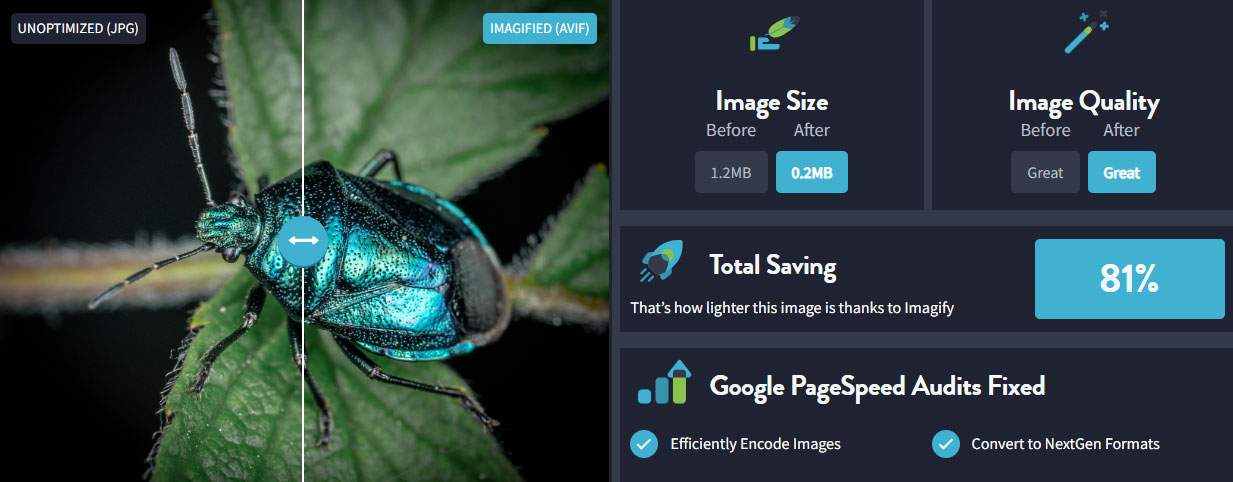
imagify

Key Options of Imagify WordPress Plugin


Smart Compression: Imagify uses clever compression techniques to minimize image file sizes without sacrificing quality. This harmony preserves visual integrity while guaranteeing quicker load times.

Next-Gen Format Conversion: Images are automatically converted by the plugin to more recent formats like WebP and AVIF, which have better compression rates than older ones. Performance and compatibility across a range of browsers are improved by this modification.

Bulk Optimization: Imagify's asynchronous mass optimization tool enables users to optimize numerous pictures at once. This feature guarantees constant speed enhancements throughout the website while saving time.

Image Resizing: In order to make sure that photos are properly sized for various devices and screen sizes, the plugin has the ability to automatically resize images to predetermined dimensions during the optimization process.

Restore Originals: Users can go back to the original, unoptimized versions of images if necessary because Imagify saves them. Flexibility and control over the optimization process are offered by this feature.

CDN Compatibility: Better worldwide website speed and quicker picture distribution are made possible by the plugin's seamless integration with Content distribution Networks (CDNs).

User-Friendly Interface: Even customers without technical knowledge may easily understand the optimization process thanks to Imagify's user-friendly dashboard.


Benefits of Imagify WordPress Plugin


Enhanced Website Speed: Imagify dramatically speeds up page loads by utilizing next-generation formats and shrinking picture files.

Improved SEO Rankings: ​Search engines prefer faster websites, which improves visibility and raises rankings.

Better User Experience: Optimized pictures improve user engagement and retention by making surfing more seamless.

Reduced Bandwidth Usage: Particularly on mobile networks, smaller image files might result in lower costs and better performance because they use less bandwidth.

Imagify is a complete solution for WordPress users that want to effectively optimize their photos. It is a useful tool for improving website performance and customer satisfaction because of its extensive feature set, simplicity of use, and adjustable cost.


Check More Premium Plugins

Click Here

Additional information

Price

1 Year, Lifetime

9 reviews for Imagify – Unlimited Optimize Images & Convert WebP

  1. Patricia Harris –

    Imagify has been amazing for my site’s speed. The image optimization is seamless, and the WebP conversion has made a noticeable difference in loading times. I love how easy it is to use and how much it improved my site’s performance

  2. Laura Adams –

    Imagify is a must-have for anyone looking to improve their website speed. It’s simple to use and really effective at compressing images without losing quality. I especially love the WebP feature — my site loads much faster now

  3. Edward Green –

    Imagify has made a huge difference in my website’s performance. It automatically optimizes all my images without compromising quality.

  4. Bilal Ahmed –

    WebP conversion is a nice touch, and I’ve definitely seen faster load times since using it.

  5. Tatiana Vasilieva –

    Using Imagify has been a game-changer for my site.

  6. Kevin Young –

    I did encounter some minor issues when converting large batches of images.

  7. Jack Davis –

    Imagify is hands down one of the best image optimization tools I’ve used. The automatic image compression and WebP conversion work flawlessly. It’s easy to use, and my site’s performance has improved dramatically.

  8. Shubham Kumar –

    I’ve been using Imagify for a while now, and it’s definitely improved my website’s load time.

  9. Shubham Kumar –

    I can’t believe how much faster my website is now that I’m using Imagify. The WebP conversion is seamless, and I love that it’s automated. My page load times have significantly improved, and I don’t even have to think about it.

Only logged in customers who have purchased this product may leave a review.

DMCA - Content Removal Policy
Why hudge discount?
What is GPL License?
Our platform shares GPL-licensed files strictly for educational and testing purposes. We highly encourage users to purchase original themes and plugins directly from the developers if they have the means to support the creators’ ongoing work and development. We respect developers’ hard work and intellectual property rights. If you are a copyright holder and believe any content on our platform infringes upon your rights, please contact us at “gnugplproducts@gmail.com” and we will address the issue within 48 hours. 
GNUGPL.org is related to the web designing softwares like themes, plugins and templates downloading website. All softwares are under GPL license so that grants users the freedom to use software for any purpose. There are no restrictions on distribution, It means that we can distribute GPL-licensed software, and even charge for it. We charge only for a small price for the every softwares that could be up to 50% to 95%. A key aspect of the GPL is its copyleft nature. This means that if someone modifies GPL-licensed software and distributes it. That’s why our charges are so cheap because we charge only for our hard work to providing GPL-licensed software.
GNU General Public License (GPL) is a widely used free software license that grants users the freedom to run, study, share, and modify software. It’s a “copyleft” license, meaning that any derivative works must also be licensed under the GPL, ensuring continued freedom for users. The GPL was created by Richard Stallman and the Free Software Foundation to protect the rights of users and prevent software from becoming proprietary.No Restrictions on Distribution: You can distribute GPL-licensed software, and even charge for it, as long as you also provide the source code and adhere to the GPL terms.How do get a GPL license? You don’t “get” it. You write inside your software (inside every file at the top, inside the readme, maybe also have a license.txt file). And you just give the name of the GPL license you want to use. There are several version (GPLv2, GPLv3…).

You can list their full names e.g. GNU General Public License v3.0

Or the shortened SPDX format name: GPL-3.0-only

You can include the text of the license (but it’s not mandatory) in a file. You can use the one from SPDX.org: Software Package Data Exchange (SPDX) or from any other reference source (FSF’s site, Open Source Initiative site).

To obtain a GNU General Public License (GPL) for your software, you don’t actually need to apply for a license. The GPL is a free software license that you can apply to your code by including the license text with your project. Here’s how to do it:

  1. Choose the Version: Decide which version of the GPL you want to use. The most common versions are GPLv2 and GPLv3. Each version has its own terms and conditions, so review them to determine which best fits your needs.
  2. Include License Text: Add the full text of the GPL license to your project. You can find the official text on the GNU website: – GPLv2 License Text – GPLv3 License Text
  3. Add a License Notice: In your source code files, include a comment at the top specifying that your code is licensed under the GPL. For example: “`plaintext This file is part of [Your Project Name].

[Your Project Name] is free software: you can redistribute it and/or modify it under the terms of the GNU General Public License as published by the Free Software Foundation, either version 3 of the License, or (at your option) any later version.

[Your Project Name] is distributed in the hope that it will be useful, but WITHOUT ANY WARRANTY; without even the implied warranty of MERCHANTABILITY or FITNESS FOR A PARTICULAR PURPOSE. See the GNU General Public License for more details.

You should have received a copy of the GNU General Public License along with [Your Project Name]. If not, see https://www.gnu.org/licenses/

  1. Distribute Your Code: When you distribute your software, make sure to include the GPL license text along with your files, typically in a file named LICENSE or COPYING.
  2. Consider Additional Documentation: You may also want to provide a README file that explains how users can comply with the GPL, how to obtain the source code, and other relevant information.

By following these steps, you can effectively apply the GPL to your project and ensure that it is legally protected under the terms of the license.

membership plan

What you looking for ?

Plugins Related?

Themes Related?

Templates Related?

Please Support Our Project

We hard work to provide free GPL Themes, Plugins & Templates. Donate a small fund to help our project or take subscription in very small fund. Take a Subscription and get all products free download. Flexible subscription start only $6 for a month, $12 for quarterly, $18 half-early and $25 for yearly.
Select your currency
